
PC Modding Mastery: Custom Case Badges for a High End Gaming Rig
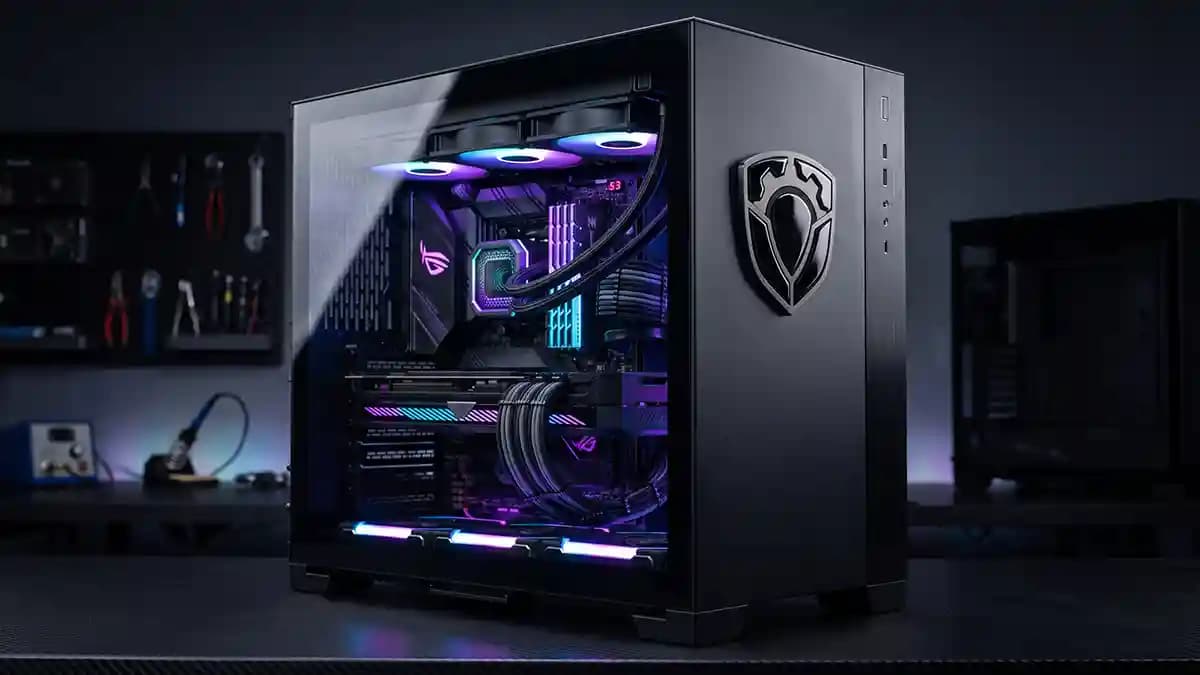
Custom case badges are the small detail that makes a high end gaming rig look finished instead of just expensive. That is my review of the title right away, because the badge is not the loud part of the build, it is the part that tells people you cared all the way to the last screw. I learned that while staring at a glass side panel, a clean GPU mount, and one sad flat sticker that looked like it came from a cereal prize box. The rig had power, lights, and cable work that made me feel underdressed, but the front badge was weak. It was like wearing a sharp suit with foam clown shoes.
The funny part is that PC modding people will spend three hours hiding cables behind a tray where nobody can see them. Then they slap any old logo on the front and call it done. I get it, because I have done it too, and I have stood there pretending the crooked label did not bother me. It did. It bothered me like a loose case screw rattling at midnight.
Why custom case badges matter in PC modding
A gaming rig is not just parts in a box. It is a little shrine to choices, money, taste, and pain. You picked the case, fans, GPU, board, lights, cable combs, and probably the one screw that rolled under the desk and left forever. A custom badge sits at the end of that story. When it looks clean, the build feels complete.
Fresh PC case design keeps proving that builders care about what people see first. At Computex 2026, case makers showed panoramic glass, cleaner back connect board layouts, modular fan ideas, and more focused GPU airflow than the old glass box look. Havn showed a smaller HS 360 with bent panoramic glass, a magnetic divider to guide air, and support for cleaner rear connector layouts. Levelplay showed magnetic reversible fans, while Phanteks pushed a case design with a more direct GPU cooling zone. (PC Gamer)
That matters for badges because modern cases are cleaner than ever. There are fewer ugly bits to hide behind. Big glass panels, flat metal fronts, tidy cable paths, and soft lighting make one cheap sticker look extra guilty. It sits there like a ketchup stain on a white shirt. Small sins get loud in a clean build.
Here is where a raised badge earns its keep.
It gives the case a finished maker style feel.
It adds depth without adding bulk.
It makes a logo feel placed, not slapped.
It stands up better to fingers and dust cloths.
It gives photos a tiny shine that flat vinyl cannot fake.
Choosing the right custom case badge style
The best custom case badges match the build, they do not beg for attention like a toddler with a pot on his head. If your case is matte black, a gloss black dome can look mean and quiet. If your build has silver heat sinks and white fans, a brushed silver look can tie it together. If your lights are purple, blue, or green, one small color hit can work. The word small is doing heavy lifting there.
Use this quick style check before you order.
Match the badge finish to one finish already in the build.
Keep the logo readable from arm length.
Use strong contrast on dark or white panels.
Avoid tiny text unless the badge is large.
Keep the shape simple if the case is already busy.
Use clear resin for depth, not for saving bad art.
That quiet space around the badge matters. A badge jammed against a panel edge looks nervous. A badge floating in a clean zone looks planned. I like a badge to sit where the eye lands first, but not where every cable and light is already shouting. Think front lower corner, PSU shroud face, side panel strip, or a clean rear plate if the build goes to shows.
If you want to see how raised labels work on electronics beyond PC cases, this electronics branding guide is worth reading. Same idea, different shell. A good badge makes a product feel more serious before anyone reads a spec sheet. That is not magic. That is human eyes being nosy.
Size and placement for gaming rig decals
Most bad gaming rig decals fail before they touch the case. The builder picks the wrong size, then tries to make it work with vibes. Vibes are not a ruler. Get the case in front of you and measure the flat spot. Do not guess from a product photo, because product photos lie like a cat near a broken vase.
Here is the sizing flow I use.
Measure the flat zone in millimeters.
Mark the planned badge size with paper first.
Step back and view it from desk distance.
Check it again with the case lights on.
Leave space around the badge so it can breathe.
Keep it away from vents and hot exhaust.
Make sure the panel can be cleaned later.
For most PC cases, the sweet spot is not huge. A 20 mm to 40 mm badge can be enough on a small case. A 40 mm to 60 mm badge works on many mid tower fronts or PSU shrouds. Bigger can work for themed builds, but big badges turn into billboards fast. Nobody built a water cooled monster so the front logo could scream like a blender full of bolts.
Placement changes with case style. Panoramic glass cases like clean side views, so a small badge near a lower front strip can work. Mesh front cases need open airflow, so keep decals off intake zones. Dual chamber cases often have wide flat side or shroud areas that take a badge well. Open frame rigs need extra care because there may be less clean surface and more heat near the parts.
Materials that make the badge feel real
A flat sticker can look good from across the room. A domed badge looks good when someone leans in and gets rude with their eyes. The raised clear layer gives the print depth, soft shine, and a smooth touch. That touch matters because people always poke a custom PC. They point, tap, and ask what the button does even when there is no button.
A good domed badge has a few jobs.
Protect the print from hands and light cleaning.
Add a raised lens effect over the artwork.
Make black look deeper and colors look richer.
Hide the cheap paper label feel.
Give the case a factory style detail.
The key is not just resin. The print, cut, adhesive, and cure all matter. If the edge is rough, the dome shows it. If the art is fuzzy, the dome makes it shiny fuzzy, which is not the win people hope for. If you care about the build, use custom 3D domed stickers that feel like part of the case, not an apology stuck on top.
Artwork rules before you send the file
Artwork for a case badge has to behave at small size. Your logo may look great on a monitor, but a 30 mm badge is not a movie screen. Tiny lines can fill in. Small words can turn into ants wearing hats. Fine gradients can look muddy under a clear dome if the design has no contrast.
Use this art check before you send anything.
Zoom out until the logo is about the real badge size.
Remove tiny text that nobody can read.
Make the main shape bold.
Add space between letters and edges.
Use fewer colors than your gamer heart wants.
Print a paper sample and tape it to the panel.
This is where most people mess up. They try to fit the whole build story into one tiny badge. The GPU brand, team name, initials, mascot, year, serial number, and a little dragon all crawl in there like people squeezing into an elevator. Stop it. Pick the one thing the badge needs to say, then let the rest of the PC do the rest.
If you want the logo to feel premium, remove stuff. Simple art looks more costly under a dome. Sharp black and white can beat five colors when the case already has RGB. A small silver mark on a matte black panel can look colder than a giant rainbow badge. Taste is often just knowing when to leave the poor thing alone.
How to install a custom PC case badge
Install day is where patience saves the part. Do not install while the case is dusty from the build. Do not install after eating chips. Do not install while angry because the front panel cable fought you for twenty minutes. That is how badges get fingerprints, crooked edges, and one corner that lifts later like it has plans.
Use this install flow.
Turn off the PC and let the surface cool.
Remove dust with a clean dry cloth.
Wipe the badge spot with a safe alcohol wipe if the case finish allows it.
Let the area dry all the way.
Place low tack tape as light guide marks.
Peel the backing without touching the glue.
Set one edge first, then roll it down slowly.
Press the full badge with even finger pressure.
The alcohol wipe step matters, but test first on painted or coated panels. Some finishes hate strong cleaners, and they will tell you by getting cloudy. I usually test on a hidden edge or inside panel lip. If the finish reacts, back off and use mild soap and water instead. A clean surface is the goal, not a chemical wrestling match.
You can learn more about the print, cut, doming, and quality checks on the how it is made page. That process matters because a PC badge has nowhere to hide. On a tiny raised part, sloppy edges look huge. It is like a bad haircut on a very small head.
Heat, airflow, and places to avoid
PC cases get warm, and some zones get warmer than people think. A badge on a cool front panel has an easy life. A badge next to an exhaust fan, radiator outlet, or power supply vent has a harder one. Heat is not always the enemy, but dumb placement sure is. I have seen people block mesh with decals and then wonder why the fans sound like a leaf blower.
Avoid these spots.
Front mesh intake zones.
Rear exhaust grills.
Top radiator exhaust paths.
Flexible side panels that bend during removal.
Rubber feet and soft rubber strips.
Areas where your hands grab the case.
Good spots are flat, clean, cool, and boring. Boring is great here. A front corner on a solid panel, a PSU shroud face, a cable cover, a smooth rear plate, or the plain side of a desktop case can all work. The badge does not need airflow. Your GPU does.
When custom case badges beat stock logos
Stock case logos are fine until they clash with the build. Maybe the mark is too big, too bright, or just not your style. If you are making a shop build, team PC, streamer rig, or personal project, the stock badge says nothing about the person using it. A custom badge gives the case a name and a point of view. For client or event builds, a bulk custom badge run keeps every case in the set looking like it belongs with the others.
Fast answers
Are custom case badges good for any PC case?
They are best on smooth, flat, clean panels away from heat and airflow. They work great on many steel, aluminum, acrylic, and glass zones if the surface is prepared well. They are not great on mesh, rubber texture, deep curves, or spots you touch all the time.
What size should a PC case badge be?
Most builds look good with a badge between 20 mm and 60 mm, depending on the case size and the open space around it. Start with a paper mockup before you order. If the mockup looks loud, go smaller.
Can I put a badge on tempered glass?
Yes, if the glass is clean, flat, and not in a place you rub every week. Glass shows alignment errors fast. Use guide tape and take your time.
Will a domed badge block airflow?
Only if you put it in a dumb spot. Keep it away from mesh, vents, radiator exhaust, and fan intake paths. A solid front panel or PSU shroud is usually safer.
Do gaming rig decals look cheap?
They look cheap when the art is cluttered, the size is wrong, or the install is crooked. A clean raised badge with simple art can look like it came with the case. That is the goal.
Final word
Custom case badges are not about making your PC louder. They are about making it look intentional. A high end rig already has the hard parts, clean cables, good cooling, strong hardware, and the glow that makes your desk look like a tiny spaceship cockpit. The badge is the final handshake. Get the size right, keep the art simple, place it on a cool flat zone, and install it like you care.
That is the whole move. Not flashy. Not fussy. Just finished. And when someone leans in and says the build looks clean, you will know the tiny badge did its quiet little job.