
The Importance of Asset Tags: Combining Durability and Traceability
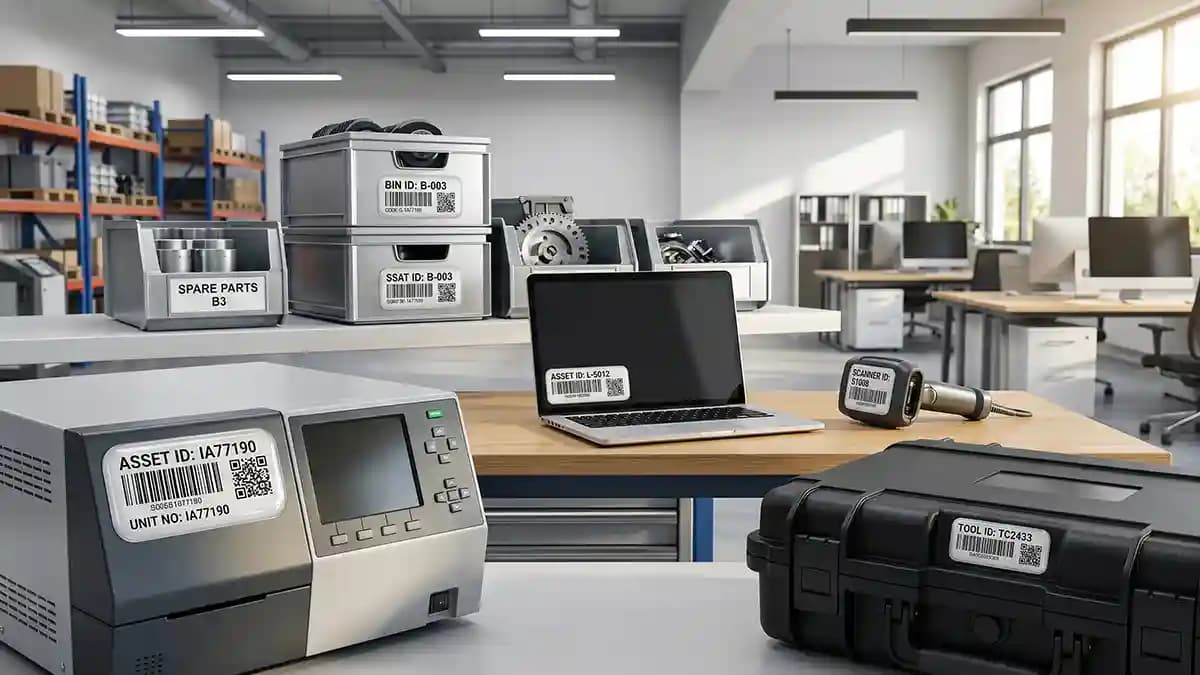
Asset tags matter because a lost tool, a mystery laptop, or a faded barcode can turn a normal workday into a tiny crime scene. I saw it happen in a workshop where three drills looked the same, two chargers had vanished, and one barcode label had been rubbed flat by dirty hands. Everyone had a theory, which was fun for about twelve seconds. Then the boss realized the asset register was cleaner than the actual system, and the room got quiet.
The fix was not magic. It was better labels, smarter codes, and a surface that could survive real use. A good asset tag does two jobs at once, it tells you what the item is, and it stays readable long after the first coffee spill, glove rub, cleaner wipe, or shelf scrape. That is the whole point of combining durability and traceability. A tag that cannot be read is not a tag, it is office confetti.
Why asset tags fail in real life
Most bad asset tags do not fail on day one. That would be too kind. They fail slowly, right when everyone trusts them and nobody remembers what the number was supposed to be. The print fades, the edge lifts, the code gets scratched, and the serial number starts looking like ancient cave art.
Here is where I see most failures start.
The label is made from cheap paper or thin basic film
The barcode has low contrast and weak print edges
The surface was dusty, oily, or rough before install
The tag was placed where hands, tools, or cables rub it all day
The label has no clear cover over the printed data
The asset list and the physical tags do not match
That last one hurts the most. A strong label with bad data is still bad. It is like putting a fresh number plate on the wrong car and acting proud because it shines. The tag looks official, but the system behind it is wearing clown shoes.
Traceability starts before the sticker exists
People think asset tracking starts when the label gets stuck on the machine. Nope. It starts before printing, when you decide what each code means. A barcode is not smart by itself. It is just a pattern that points to a record, and if that record is messy, the scanner only helps you find the mess faster.
A clean asset tag plan needs a few simple choices.
Use one unique ID for each item
Keep the numbering format simple
Decide what the code will open or identify
Match every printed tag to your asset list
Save a backup file before tags are produced
Keep the human readable number near the code
Test scan a sample before making the full run
I like human readable numbers because scanners are great until they are not. Batteries die, phones glitch, and someone drops the handheld unit. When the printed number is still there, the team can type it in and keep moving.
Durable barcodes need protection, not luck
Durable barcodes are not just normal barcodes printed with more confidence. They need sharp contrast, clean edges, enough quiet space around the code, and a cover that protects the print from hands, light, moisture, and cleaners. I have seen labels on toolboxes get wiped so much that the black bars turned gray. That is not tracking, that is slow disappearing ink with extra steps.
A clear polyurethane dome changes the way a tag lives. The barcode or serial number sits under a raised clear layer, so the printed data is not the first thing that meets the scratch, wipe, or bump. The dome also gives the label a smooth surface that is easier to clean. That matters on machines, cases, carts, control boxes, cameras, tools, and any gear that gets touched a hundred times a week.
This is the same reason I like domed stickers for branding jobs that need to last, not just look nice on day one. The clear top layer adds depth, but it also acts like a shield for the print. For asset tags, that shield is not about beauty. It is about keeping the code readable when the item gets treated like a rented ladder.
What should go on an asset tag
A good asset tag should show only what helps the next person do the job. Tiny labels packed with too much text are a pain. Nobody wants to read a full diary on the back of a power supply. Keep the visible data clean and push the deeper data into the system behind the code.
A strong asset tag layout can include this.
Company name or mark
Unique asset ID
Barcode, QR code, or Data Matrix code
Short department or asset type code
Clear edge space so the scanner can read the code
Do not make the code too small just because it fits on screen. Screens lie. Print it, dome it, scan it, and scan it again under normal light. If it only scans when you hold your phone like you are photographing a rare bird, the code is too small or too crowded.
Barcode, QR code, or Data Matrix
Picking the code type is where people start acting like they are defusing a bomb. Relax. The best choice depends on the data you need, the scanner you use, and the size of the tag. A long one dimensional barcode needs more width, while QR and Data Matrix codes fit more data in a smaller square.
Here is the simple version.
Use a one dimensional barcode when you need a basic asset number and have enough label width
Use a QR code when phones need to scan the tag and open a page or record
Use a Data Matrix code when space is tight and the data needs to stay compact
Use a human readable ID with every code, no excuses
Test with the devices your team will actually use
The last point matters more than people think. Do not test with your newest phone under bright office light, then send tags to a dusty warehouse where workers use older scanners. That is like testing hiking boots on carpet. Cute, but useless.
Domed asset tracking is not just for factories
When people hear asset tags, they picture gray metal shelves and a clipboard from 1997. I get it. Asset tracking has the personality of a filing cabinet. But domed asset tracking makes sense anywhere items have value, move around, or get cleaned often.
I would use traceable labels on these without blinking.
IT laptops, tablets, monitors, docks, and chargers
Camera bodies, lenses, tripods, lights, and cases
Medical carts, lab tools, and diagnostic gear
Warehouse scanners, toolboxes, pallet jacks, and bins
Rental equipment, service cases, fleet tools, and spare parts
The funny thing is, most losses are not dramatic. Nobody is rappelling through the ceiling to steal a charger. Stuff just drifts. One person borrows it, another person moves it, someone puts it on the wrong shelf, and then everyone looks at the empty hook like it owes them money.
Where to place asset tags so they survive
Placement is half the job. You can buy a strong tag and still kill it by putting it in a stupid spot. I say that with love, because I have done it. I once placed a tag right where a case rubbed against a rack, and it looked like a raccoon tried to remove it with a spoon.
Use these placement rules.
Pick a flat and smooth area
Avoid corners that get hit first
Keep away from handles that hands grab all day
Avoid vents, hot zones, hinges, and moving parts
Place the tag where it can be scanned without lifting the item
Use the same placement zone across similar items
That last one makes inventory faster. If every laptop tag lives in the same place, the team stops hunting. If every toolbox tag is on a different side, someone ends up spinning boxes around like they are playing a sad game show.
Surface prep makes or breaks the job
Adhesive is strong, but it is not a wizard. It cannot stick well to oil, dust, hand grease, silicone spray, old glue, or mystery shop grime. Clean the surface first, then let it dry. If you skip this, the label can lift, and then everyone blames the label like it had a personal agenda.
Here is my basic install process.
Wipe off loose dust and dirt
Clean the area with isopropyl alcohol or a safe surface cleaner
Let the surface dry fully
Check that the tag sits flat before peeling
Press firmly across the full tag
Leave it alone while the adhesive builds strength
If the asset is cold, bring it to room temp first. Cold surfaces make glue grumpy. That is not a lab term, but it is accurate enough for a workshop.
Why the clear dome helps with cleaning
A flat printed label has a rougher life because the print sits closer to the danger. The first scrape reaches the graphic sooner. A domed tag adds a smooth clear layer on top, so light scuffs and cleaner wipes attack the dome first. It is like putting a clear visor over the data.
This matters for shared equipment. Shared items get wiped, sprayed, passed around, stacked, dropped, and shoved into cabinets by people who are late for lunch. A domed surface gives the printed barcode and serial number a better chance to stay clean and readable. It also feels more finished, which sounds small until you put one next to a flat paper label and the flat one looks like a sad office sticker.
The production path matters too. Print quality, exact cutting, doming, curing, and final checking all affect the result. If you care about that process, the How It Is Made page shows how the clean print, cut, dome, cure, and quality check flow works for raised resin labels.
When you need custom asset tags
Standard tags work fine for simple office items. Custom asset tags make sense when the item has unusual size, a curved panel, harsh cleaning, outdoor use, brand rules, or a code system already in place. This is where one size fits all becomes one size annoys everyone. I have never met a universal label that did not eventually meet a weird surface and lose the argument.
Custom tags help when you need these.
Exact size for a small flat zone
Custom shape to fit a panel or recess
Brand colors for a clean company look
Sequential serial numbers from your asset list
QR codes linked to service records
Durable barcodes for rough handling
For bigger batches, it is smarter to plan the data file before print. A spreadsheet with asset ID, code value, item name, department, and location can save hours. This also helps when ordering through Wholesale and Bulk Orders, especially for fleets, garages, schools, service teams, or any group that needs repeat sets.
The mistake that makes asset tags useless
The biggest mistake is treating the tag like the whole system. It is not. The tag is the front door. The real value is what sits behind it, like service history, owner, location, purchase date, warranty, and replacement plan. If that data is wrong, the prettiest tag on earth just points to bad information.
Keep your asset system clean with a simple rhythm.
Add new items before tags are applied
Scan the tag after install and confirm the record
Update location when the item moves
Mark damaged or missing tags fast
Reprint replacement tags with the same ID
Audit the list on a set schedule
This is not glamorous work. Nobody will make a movie about it. But when a tool goes missing, a laptop comes back from repair, or a rental case returns with half the gear gone, clean traceability suddenly feels like the smartest thing in the room.
Quick Q and A
Q: What are asset tags used for?
Asset tags are used to identify, track, and manage tools, machines, laptops, cases, and other valuable items. A good tag connects the physical item to a record in your system.
Q: Are domed asset tags better than flat labels?
Domed asset tags are better when the label needs extra protection from rubbing, cleaning, moisture, and daily handling. The clear raised layer helps protect the print and keeps the barcode or serial number readable longer.
Q: Can QR codes work under a clear dome?
Yes, QR codes can work under a clear dome when the print is sharp, the contrast is strong, and the code is not too small. Always test scan a sample before ordering the full batch.
Q: Where should I place an asset tag?
Place it on a flat, smooth, clean area that does not rub against hands, racks, cables, or moving parts. Make it easy to scan without turning the item into a puzzle.
Asset tags are not fancy, but they save money, time, and arguments. They keep your gear tied to a record and your inventory from turning into a guessing game. Use durable barcodes, traceable labels, and a clear protective dome when the item has to survive real work. Your future self, probably holding a scanner in a storage room, will thank you.